

Growing a Twitch channel is best achieved through two main methods; generating traffic through effective promotion and creating good quality streams viewers will come back to watch again. Setting a consistent stream schedule, playing niche games, networking with other content creators are also highly popular methods of growing on Twitch.
As competition on the platform increases successful streamers playing popular games dominate the thousands of streamers just starting out who struggle to reach their target audience.
This post will go over several things you can do to get followers to grow on Twitch.
1. Create Entertaining Content
We conducted a poll of Twitch viewers and asked them for their top driving factor in what they look for in a stream. Options included graphics, good gameplay, or having an entertaining personality. Overwhelmingly, participants stated that the most important way to attract repeat viewers is by streaming entertaining content.

Contrary to popular belief actually being good at the game you play wasn’t a high ranking factor. It’s also worth noting that when your view count surpasses 500, people searching for the social aspect of streams would be less likely to join your community at that point.
Consistently producing quality content from day one will give you a powerful reputation. Keep your viewers interested in what you will do next. Set aside time to plan out future streams. Talk to people who will give you honest feedback for advice on how to improve your content and strive to do better every time you get in front of that camera.
2. Use Quality Equipment
While you don’t need to invest in top-of-the-line equipment, you do need to have streaming tools that show you are serious about producing high-quality visuals and audio. People will leave your channel right away if you are lagging, have poor video, or have problems with your sound.
In addition to a good webcam that will deliver crisp color, you should invest in lighting equipment to alter the look of your stream. Good lighting can fill in shadows to illuminate your scene and reduce or create contrast (depending on your style). This simple step might even show a potential viewer that you mean business from your thumbnail alone.
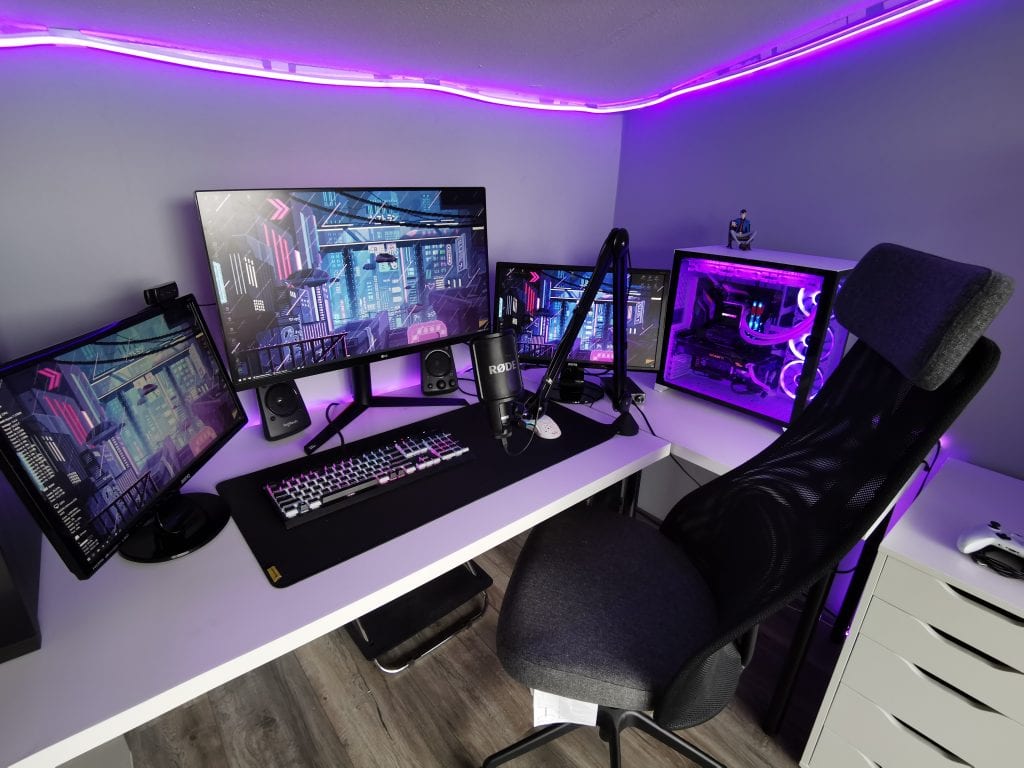
Use a decent microphone that picks up your voice but doesn’t pick up a lot of extra background noise. Practice using it so that you know how far away you should be from it for the best quality.
Perform frequent sound checks (you can do this by clapping) with your streaming software to make sure that your video and audio are synced. Speak clearly and enunciate your words. Do not scream or make obnoxious noises into your microphone.
3. Promote Your Stream on Socials
Don’t misunderstand us. We are not telling you to self-promote. There is a fine line between promoting your stream and spamming people. If you join a group for streamers, make sure to read (and follow) the rules. Some groups allow you to post when you begin to broadcast. In those cases, find a way to sell your stream. Entice viewers to check you out.
The other day, I was browsing promotional posts for streamers. Several of them promised me I would laugh if I visited their channel. One of them said I could leave if I didn’t laugh in the first five minutes (I’m so glad they permitted me). And one post made me laugh. Out of those posts, which one do you think I visited? The one that proved they were capable of delivering their promise. If humor is a part of your broadcast, don’t tell people that you are funny. Show them that you are. They will be more likely to check you out.
As you build your community on your social media accounts, post valuable content for your followers. Don’t just tell them when you’re going live. Whether you use Facebook, Instagram, Twitter, Discord, or another network, have a clear schedule and remind them that you’ll broadcast.
You can’t expect regular viewers if nobody knows you are streaming.
Depending on which platform you are using, we recommend joining these network pages:
Don’t waste your time on Follow for Follow groups!
In this growing industry, it is sometimes difficult to attract people’s attention to your stream.

4. Host Giveaways
Another way to potentially attract viewers is to announce stream giveaways. Let your followers know ahead of time on your brand’s social media accounts and also mention it in your stream’s title. Your current followers will show up, which will bump your channel up in rankings, allowing new viewers to find you. Here are a few things you should do to entice those new viewers to return on your next stream.
-
Entertaining
Make sure your stream is entertaining and on point. While you may have won the click with the promise of a prize, strive to win their hearts with your high-quality content.
-
Relevant Prize
Make the giveaway item something relevant to your game or category. This can be as simple as a special skin in the game you are playing or guitar strings in your music channel.
-
Advanced Promotion
If you give away something of high-intrinsic value, announce that you will be giving the object away well in advance and remind people several times before the giveaway date. This way casual viewers who visit your stream before that giveaway will be more likely to return on that day. Allow the hype to build!
5. Don’t Stream Over-Saturated Games
Top games such as Fortnite, CS:GO, and League of Legends command a lot of attention. They are also played by a lot of streamers (in June 2019, Fortnite was streamed by an average of more than 8,000 channels at any given time). Unless you come into Twitch with an existing following, it will be nearly impossible to get discovered organically when streaming saturated games.
Instead, find games that people want to watch but are broadcast far less. If you are able to reach the top twenty in one of these categories, people will be able to find your channel easier. You can also look into the analytics of games that you wish to play to find out when there is a lower streaming activity for them. This will improve your chances to climb further up the list.
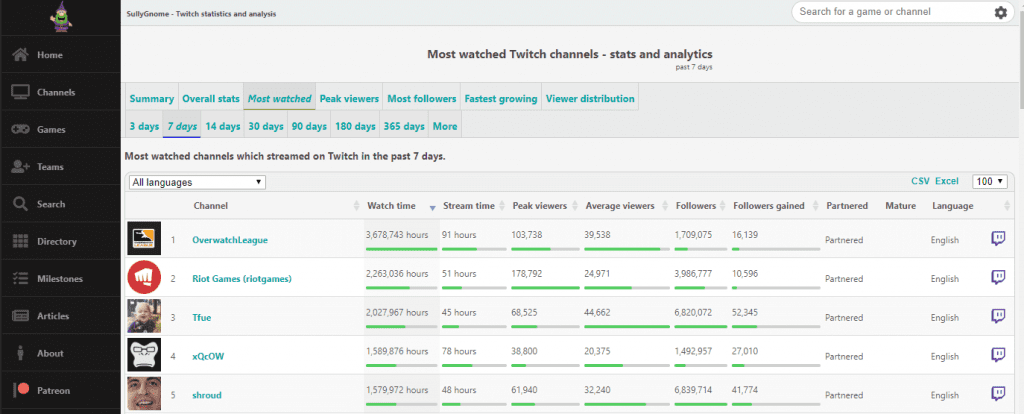
SullyGnome is a great analytics site that allows you to quickly see the average number of concurrent streamers and viewers. You can look at the analytics for anywhere between the past three days to the past year or search for specific months. You can also view the times where games were viewed and streamed the most. Use this information to your advantage.
If you want to play saturated games, do so sparingly and understand that you may get very few views if you don’t actively promote your stream. Do it for yourself and for your own enjoyment. Over time, your community may help you become more discoverable on these games as well.
6. Keep Talking Throughout Your Stream
While it may feel unnatural to continually speak if nobody is verbally responding to you, it is important to continually chat throughout your stream. Practice this in your day to day activities. While you cook, clean, get ready for your day job or any other activity, actively narrate your activity. In time, “talking to yourself” will become quite natural.
Here are some ideas to keep the conversation flowing:
Even something that seems that mundane will show casual viewers that you want to engage with them and they may begin to share their own stories with you. Here are a few things you can discuss:
- Funny events of the day
- What you did last weekend
- What you plan to do next weekend
- Where you would like to vacation
- What you plan to have for dinner
Additionally, you should make a habit of doing the following:
-
Continually Respond to Viewers
When a viewer begins to converse with you, pay attention to what they say and respond back to them. Some viewers have low attention spans and if you don’t respond right away, they may leave your channel in search of another. Vigilantly watch your chat. Establish a connection with them and they will return.
-
Add Your Followers Questions/Trivia
If the conversation begins to lull, ask questions to revive your audience. You can poll them on their likes and dislikes, ask them what they would like you to do in the future, or even ask random trivia questions. This will also connect your viewers to each other to build a stronger network. Viewers can create emotional connections with your community which will both entice them to return and potentially donate to your channel.
-
Engage with Your Subscriber’s Lives
As you get to know them, ask about them when they return to your stream. Try to remember past conversations and what their hobbies and lives are like. This will endear you to them more.
-
Talk About Personal Interests
Talk to your audience about something that interests you or that you know a lot about. The Minecraft YouTuber, MumboJumbo, often talks about his passion for drones and even built one in Hermitcraft Season 4. If you have a lot of knowledge of an interesting topic, share information about it.
-
Continually Thank People for Support
If someone follows, subscribes, or donates, thank them. Treat everyone with gratitude and respect.
It is your responsibility to keep the conversation moving. The more you interact with your viewers, the more fun you will have, which will improve your mood. This will make improve your chances that they will follow you and return the next time you stream.
7. Ignore Your Viewer Stats During Your Performance
Watching your stats while you stream is never a good idea. If you are fixated on your numbers, you won’t be focused on producing valuable content. You may also become discouraged if your viewer count is low or if you aren’t growing as quickly as you would like.
Visitors (and your current viewers) will be able to pick up on your frustration and may be put off. Focus on enjoying yourself and your current followers while you create your stream.
That being said, analyzing your stats after your show is a good idea to improve future streams. Find the areas where your viewership peaked and write down what you were doing at the time. Incorporate similar content later. To find detailed statistics, go to your creator dashboard, then stream summary. You can also check external sites like SullyGnome.
8. Use Good Graphics
Influence new visitors to click on your stream by adding the best overlays to your channel. These will appear on your thumbnail. Don’t overfill the screen, but a few quality graphics will help your channel stand out.
If possible, design or commission Twitch panels for your profile. Make sure they are original, clean, and descriptive of your style. If you have your graphics professionally done, make sure to explain to the designer your concept and any important details. Send them the color codes you wish used and any examples you’d like them to emulate.
Potential followers will scroll down to read what you have written in your Twitch profile. Fill it with information about yourself, what you stream, when you stream, your chat rules, and anything else that may be relevant to you or your channel. Make sure to check your spelling and grammar. Try out the free software Grammarly to proof your words for you.
9. Use a Catchy Stream Title
Use a descriptive and enticing stream title to attract viewers. Keep interesting keywords toward the front of the title that describes your content. Keep the description honest or mention a special event or something unique you plan to do on your stream.
Don’t beg for viewers by mentioning follower counts or that you are trying to reach a certain milestone. Instead, you can welcome them with a title that states, “Join Me While I (do whatever it is that you intend to do).”
10. Invite Your Social Circle to Watch You
Every new Twitch streamer starts off with zero followers. If you are active on social media and already have a following, let them know about your first stream ahead of time. Many of them may show up to support you in your new venture.
Even if you don’t have a social following, ask your friends and family to tune in to your channel. Even if they aren’t actively engaging, they will help your viewer count, raising you in your specific category, allowing other potential viewers to easily find your content.
If you play an MMO with a group of people (such as a guild or an alliance), let them know about your stream and invite to watch or play with you during it. This will bring people who are interested in your specific game-play and the collaboration will be more interesting for your viewers.
Having the support of your friends and family will help to bring immediate energy to your stream. You will be able to interact with them on a personal level that will attract viewers who are casual browsing stations. Your following will be able to integrate new members into your growing community.
11. Collaborate with Other Streamers
Find people of your same caliber that share your interests. If you can collaborate with friends and streamers with whom you have good chemistry, viewers will be drawn into your content and want to see more. View fellow streamers as allies, not competition.
Plan joint streams ahead of time and decide how best to approach your content. Keep both of your audiences in mind and be respectful of each other. Celebrate each other’s milestones and encourage each other to keep pushing ahead in your streaming careers.
As their viewers become attached to you, they will also follow you and vise Versa. A great example of this is the Hermitcraft Server. There are more than two dozen players on this stream-centered Minecraft server and while most players generally do their own thing within the game, they often collaborate with each other or tour other player’s areas to show their viewers other players’ masterpieces. They generally have a “group project” as well and interact with each other’s communities in that way. Through this experiment, when new players join at the beginning of the new season, their follower counts skyrocket very quickly as viewers like to see the server from many angles and follow every event.
Another benefit of collaboration is that you can host each other when you aren’t online. Shared-hosting increases the chances that you will share followers and you can simultaneously build your channels together. Hosting other channels may also mean that there will already be viewers on your channel when you log on for your own stream.
12. Attend Community and Official Meetups
Meeting people in your community with similar interests will naturally generate interest in your stream. Search social networking sites (such as Facebook) or classified advertisement sites (such as Craigslist) for events related to your channel in your general area.
You can also check message boards at your local library, events center, or at local stores related to your content (such as GameStop). If there are no events related to your activity in your community, consider collaborating with a business or with friends in creating your own!
Tell people who see your work in the real world about your channel. For instance, if you broadcast live music and teach or perform on your guitar in your real life, let your students or audience know about your streams. Print up business cards (MOO makes affordable, unique mini cards that stand out) or fliers with your stream information to hand out to people as you network with them.
Visiting international streaming or gaming events will also help you network and meet people with whom you can potentially collaborate. Here are a few that are held annually:
- E3 (Electronic Entertainment Expo) is held annually every June at the Los Angeles Convention Center in California. Gamers, sponsors, and developers from over 100 countries attend to learn and network with each other.
- TwitchCon is annually held in California, USA and in Europe. Here you will be able to meet fellow streamers (perhaps set up collaborations), watch esports live, and learn things that will improve your channel.
Originally known as Penny Arcade Expo, PAX Events are held annually in 5 US cities and in Melbourne, Australia. These festivals celebrate all aspects of gaming culture and are a good place to meet other streamers and gamers.
13. Upload Creative Stream Highlights to YouTube
Create unique content for YouTube to drive viewers back to your stream. As people get to know your persona, they will want to interact with you live and will be inclined to follow you on Twitch. Game compilations don’t always get a lot of attention unless there are very few videos for that particular game or you have exceptional skill in it or in editing.
Another possible way to gain followers through compilations is to do something abnormal in your category or role-play a bit. Here are a few ideas to get your creativity flowing:
-
The Auction House Master: Bigger and Better
If you are playing an MMORPG, go to the marketplace and play the “bigger or better” game. Ask other players to trade something either bigger or better than whatever item you begin with. Don’t ask for specific trades, just say, “I’m playing the bigger or better game. Would you please trade me something bigger or better than this carrot?”
Once someone trades you another item, use that item for your next trade until you are traded something amazing. Not only would this be an interesting (and engaging) stream to watch, you can upload the video to YouTube with the title, “How I Traded a Carrot for an (awesome item) in (this game).”
If you remember who you traded within the game, you can then message them in-game and let them know of the outcome of your experiment and invite them to see the whole process on youtube. They may share the video with their friends, and some may follow your channel to watch your next stunt firsthand.
-
The Musician or DJ
You can also involve your community. If you are a musician or DJ and you’ve involved your viewers into a current creation, upload it to YouTube with title, “My Viewers Helped Create this Medley.” Let your followers know you’ve done it in your next stream and many of them will share it because of their participation in the process.
Lara6683 did a similar experiment and uploaded a 1.5 hour long medley compiled of short snippets from songs her viewers requested in the chat. While she was already quite popular at the time, the video has over 2 million views and many people have found her Twitch channel through that video.
-
Mr. Positivity
Spend a few minutes at the spawn point of a game. As people die and respawn, comfort them by reminding them of their self-worth, praising their efforts, and encouraging them to do better next time.
Try to be ironically serious and it should spark hilarious content that would make a fabulous 5-10 minute compilation on YouTube. Especially if you get some angry feedback from disgruntled gamers. Have your viewers help you come up with things to say to people as they spawn.
-
The Blooper Reel
Compilations don’t always have to be about great achievements. If you normally stream while you do calligraphy and you were right in the middle of a flourish when the ink bottle tipped, soiling your artwork, table, and your favorite sweater, upload it to YouTube with the title, “Calligrapher’s Day Ruined When the World Went Inky.”
-
Class is in session
Create educational content about your subject or game. When Albion Online went live on Stream in 2018, Lewpac uploaded several videos to teach new players how to play a game that otherwise had very information available. You can even begin to teach new streamers how to build their channels once you’ve mastered your niche on Twitch.
In addition to building your viewer base on Twitch, you’ll have fans on another platform that might add to your community in another way. It will also increase your opportunity for revenue through YouTube’s ad program.
14. Contribute Valuable Content to Online Twitch Forums
Visit online forums that relate to your content and establish yourself as part of their community by helping people or contributing good information relevant to the topic. If someone asks a question, give a well-written response that gives the poster (and all other readers) the answer they sought.
Do not ask for viewers, as this is considered spam. Instead, have your Twitch information as part of your profile. People who appreciate your content may pay your channel a visit.
Additionally, you can learn a lot from Reddit and other forums that may improve your own abilities, which you will be able to incorporate into your stream.
15. Save Videos and Clips to Your Twitch Account
Save interesting sections from your stream on your Twitch account for viewers to browse when you are offline. This will allow them to preview your content and some may follow so that they are notified next time you come online. It is also a good way to keep your current followers in the loop of things you’ve produced if they were unable to catch a stream.
To help you determine which videos to save, look through your analytics after you have finished your show to find the areas where your followers were most engaged or your peak views. Use these shots to your advantage.
In Conclusion:
Don’t try to cheat. Instead, build you following one person at a time and connect with as many of your viewers are you can.
Make sure to have fun. Your joy will be contagious and rub off on the people who view your content. On the flip side of the coin, if you aren’t enjoying your content, neither will your viewers.

Luci
Luci is a novelist, freelance writer, and active blogger. A journalist at heart, she loves nothing more than interviewing the outliers of the gaming community who are blazing a trail with entertaining original content. When she’s not penning an article, coffee in hand, she can be found gearing her shieldmaiden or playing with her son at the beach.