

Twitch has strict guidelines for the songs you can play on stream. Ignoring the rules to play songs that are protected music will be committing copyright infringement and could cause your live streaming content to get deleted. In some cases, the streaming platform may permanently ban your account from the platform for playing licensed music.
We have gathered the opinions from the top streamers on our 30,000+ member Discord community to craft this list of the best places to source music for stream playlists.
DMCA Free Music for Twitch
There are several places you can get Twitch safe music for your Twitch account, allowing you to stream freely without having to worry about DMCA (Digital Millennium Copyright Act) takedowns. Here are 11 of the best options:

1. Epidemic Sound
The undisputed leader on this list is Epidemic Sound. The platform offers over 30,000 tracks of royalty-free music in several genres and is compatible with Spotify. Using their program, you will have the ability to listen to each tune on their music player, then download each part of an audio track separately if you wish. This makes it easy for you to create your own unique playlists and Twitch sound alerts or use a portion of a song for a YouTube compilation.
Their affordable personal license covers music for YouTube, Facebook, Instagram, and Twitch, and the company offers a free 30-day trial that will allow you to see firsthand what the platform has to offer.

Epidemic Sound owns all of its music and adds new tracks on a weekly basis. The platform works directly with each of their artists and composers on a long-term basis (though they don’t require the artist to remain exclusive). As Epidemic owns the music, you won’t have to worry about copyright strikes or takedowns.
They will make claims on accounts that upload videos without an active subscription, but won’t make past claims on accounts that previously uploaded content while having a subscription. You can easily link your channel to Epidemic to make it that much easier for no claims to be made.
2. OWN3D Music
While they are generally known for their professional Twitch graphics, OWN3D also has a Twitch music program specifically designed for streamers. They have created over 200 LoFi and Synthwave songs (on 8 different albums) that are completely free to use.
The tracks are fair use and there are no strings attached to using them. They plan to add new tracks periodically as well, so you won’t have to worry about growing tired of the same tunes over and over again.
While you normally can’t play Spotify on Twitch, you can use their playlist, making it easy to integrate with Twitch and Spotify Twitch extensions.

3. Envato Elements
Envato Elements can definitely act as a one-stop shop for many of your branding needs. Not only do they offer over 72,000 royalty-free audio masterpieces, but they boast over half a million royalty-free sounds. You can simply search through their collection using the filters listed on the left-hand sidebar to easily find music perfect for your Twitch stream.
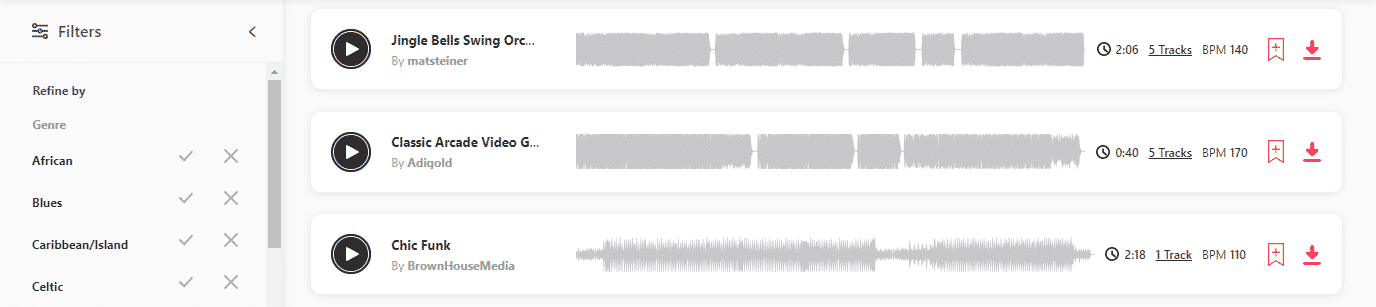
Once you find the music you like, you can either download it or add it to a collection that you can sort through later. You can add and delete several collections to keep everything organized.
For Twitch content creators who are actively growing their brands, an Envato Elements membership not only gives you access to all their fair use music and sounds, but also gives you access to stock video, video templates, graphic/social media templates, and more. These tools allow you to quickly and effectively build your brand while maintaining a professional look overall.

4. Comma Music – Award-Winning Music
Not only does Comma Music allow you to search through thousands of tracks by genre and style, but they are also the only royalty-free music library to offer a student plan. You can easily create playlists that you can use on Twitch and other sites while streaming or creating traditional content.
Their music has been cleared for monetized content, so you don’t have to worry about them coming after you with a DMCA strike. They work with top composers so that you can get the next-level music that you and your community will enjoy video after video. In fact, their music has been used in many well-known brands’ commercials or events.
They have several subscription plans available depending on what your goals for the music included as well as where you are in life. Occasionally, they will provide an additional discount to content creators if you agree to subscribe for a year or more.
5. Artlist
With an Artlist membership, you can rest easy that you can download unlimited music for your stream. Trusted by many major companies, choosing music from Artlist makes it easy to find soundtrack audio for several different platforms, including Twitch and the social sites you use to grow your brand.
Artlist has three different plans that will allow you to get unlimited music that you can use while you have a membership. Artlist will never copyright claim any content you make while you are subscribed to their platform. They also upload new audio from their artists on a daily basis, allowing you to always have something fresh to listen to or use on your Twitch channel.
With their Music content and SFX plan, you can download unlimited music and sound effects.
6. Jingle Punks Music on Streamlabs Prime
One of the many benefits of Streamlabs Prime (their premium plan) is access to Jingle Punks Music and their own music library of over 100,000 tracks in over 100 categories. The music sounds professional and clearly mimics the genre of your choice. You have the option of using their pre-made playlists or creating your own.
As this app is created with Twitch streamers in mind, there are a couple of great features. The first is that you can set up customized notifications for your steam when the song changes. You can also set up the music so that your audience hears it, but you don’t. This is helpful when you are gaming and you must pay attention to in-game sounds or Discord.
7. Pretzel Rocks
Pretzel Rocks is another popular platform that provides DMCA-safe music for your broadcasts. It is free to use but requires mandatory chat attribution unless you get the premium plan. The plan costs $4.99 per month and gives you a Discord role and access to support. 70% of the fees go to the musicians who recorded each soundtrack.
8. Stream Beats by Harris Heller
Harris Heller of Alpha Gaming has released over 6 hours of music that he allows streamers to use for free on their channels. A streamer himself, he understands the difficulty in finding good music that you can use without the risk of DMCA strikes.
9. Incompetech
Incompetech provides a large variety of music that you can download and arrange to play on your stream. You can use the songs for free with attribution. To avoid attribution, you must pay $20 per track. Paid licenses allow you to use the song in any project you like for life.
10. Monstercat
You can broadcast Monstercat’s music on your live stream for $5 per month. If you don’t plan to monetize your channel, you can use it for free. The service is available for Twitch, YouTube, and Facebook Gaming streamers. To listen to their music, visit their own Twitch channel.
In late 2020, Monstercat and Twitch joined forces and any streamer who signs up for Monstercat will automatically get Twitch affiliate status. To be clear, this doesn’t guarantee viewers or income.
11. SoundStripe
SoundStripe has two premium plans to let you access their weekly-updated music library. The first is $11.25 per month and includes unlimited music licenses and playlists. The second is $21 per month. It gives you the same features as the first, plus over 30,000 sounds that you can use during your Twitch stream, allowing you to create a good connection with your viewers. Additionally, it offers pre-released music and over a thousand tracks with stems.
Royalty-Free YouTube Channels You Can Play On Stream
In addition to these platforms and apps, there are a few musicians on YouTube that offer royalty-free content for the public domain. Some ask for attribution. You can also feel free to create your own playlists from songs on these channels to use during your broadcast. Consider reaching out to other content creators who have their own curated library of original music. Ask them if they are willing to work with you and let them know how you can help support their channel.
Here are ten channels that you can currently use as background Twitch music for your audience:
-
Comfi Beats
Lili Pichu has become one of the most well-known and loved streamers. She is loved for her personality as well as for the video game music she plays. She has a channel, Comfi Beats dedicated to uploading music that others can use as part of their streams. Please give her credit.
-
Game Chops
Game Chops allows you to use their video game music as long as you give them credit. They often will redo your favorite gaming tracks in a way that they can remain royalty-free. You can easily credit them with an overlay on your stream and you can leave a link to them in your description.
-
Chillhop
With dozens of playlists for a variety of moods, Chillhop creates music that goes well with almost any stream. They also allow their music to be used with credit.
-
Royalty Free Music – No Copyright Music
The name explains it all. This channel has hundreds of songs in several genres. You can use one of their playlists or create your own for your stream.
-
Adrian von Ziegler
Adrian von Ziegler is a composer from Switzerland who creates fantasy and Celtic-styled music. He kindly allows anyone to use his music with proper attribution. He does ask for you to purchase the music first, but you can use it in your projects. He clearly states his terms in the top comments of his music. Please read them if you choose to work with him.
-
Audio Library Plus
Audio Library Plus is another YouTube channel similar to Royalty-Free Music. They are continually adding songs in several genres for your use.
-
NCS 24/7 Live Stream
This stream began on November 22, 2017. It plays Dubstep, Trap, EDM, Electro House on a channel dedicated to “Gaming Music.”
-
Kevin MacLeod
Kevin MacLeod has composed over 2,000 songs and has made most of them available for common fair use.
-
Johnny Easton
Johnny Easton is an amazing pianist who has composed several tunes. He is happy to share music with attribution. Read his About section on YouTube for more information.
-
Josh Woodard
Josh Woodard is a songwriter, musician, and vocalist. He allows you to download and use his background music with attribution.
Copyrighted Music Limits What You Can Do With Your Content
While the Twitch music policy (as well as other platforms) may be more lenient toward your content, other apps and companies will put strikes against your Twitch channel for copyrighted music. If you are interested in using clips from your streams for YouTube collaborations, you must make sure to use royalty-free Twitch music. YouTube is very strict with their music policy and non-compliance could get you a strike on your account.
Twitch Artists
Browse Twitch’s Music & Performing Arts directory for artists creating original content. If you enjoy their style, reach out to them and ask them if they would allow you to use some of their music with attribution. Let them know your style of broadcast and how you can help them in return. You may be able to find collaborators in an entirely different category as your own!
How to Stream Any Music on Twitch
If we still haven’t convinced you to refrain from playing copyrighted material at the same time that you stream, you may be able to reduce the number of times your Twitch streams are impacted by copyright laws. Most of the mutes come from an audio recognition software used by the platform. If you keep the music quieter than the rest of your stream and continually keep talking, the bot may not pick up on the infringement. That being said, we wouldn’t risk using copyrighted material on our next stream.

Frequently Asked Questions
Can You Play Background Music on Twitch?
There are plenty of services that offer free music and whole playlists that are Twitch-approved. On Twitch all songs must be copyright-free. With DMCA takedowns becoming more regular and bans being handed out after three strikes, it is important that you keep your channel protected by following Twitch TOS.
Can You Play Royalty Free Music on a Twitch Channel?
Royalty-free music is the only kind of music you can play on Twitch without risking a DMCA takedown. There are several copyright-free music providers online that you can use for any genre of music.
How Do I Get Permission to Play Music that is Copyrighted?
In order to get permission to use copyrighted music, you must identify the copyright owner of the intellectual property (generally a record label) then contact them. You will often need to negotiate financial compensation for the music licensing in order to use those tracks on your Twitch streams or YouTube videos. Any Twitch accounts that fail to do so will be liable for copyright violation
Are You Allowed to Play Spotify on Twitch?
You are not allowed to play copyrighted music on Twitch. Even if you have Spotify premium and can access their full music library, you do not own the appropriate rights to any of the music.
Can You Play Copyrighted Music While Streaming?
You are not allowed to play copyrighted music while live streaming. It is illegal to use it for both background music and a cover song and it could get your Twitch account banned from the platform. Currently, if a streamer gets three DMCA strikes (copyright claims) for using copyrighted materials they will lose their account, even on past content stored on the platform.
Do I Need Permission to Use a Song in a Video?
If you aren’t using creative commons music, you will need to get permission from the copyright holder to use the song in the video. If you don’t, your video could be taken down or be given a copyright strike.
Can I Use 10 Seconds of a Copyrighted Song?
There is a myth that under the “Fair Use” act that, according to copyright laws, you can use a section of audio soundtrack that is between 10-30 seconds long, so long as the track is longer than that. This is untrue and you could receive a DMCA strike on your account if you play any portion of a song on your Twitch channel.

Chris
Chris is a marketing major with a strong background in small business and influencer branding. He applies his knowledge of content and promotional strategies to design actionable advice for new and intermediate streamers. When he’s not busy crunching analytics, he can be found in the salt pits of League of Legends.